
Approve actions
Review an action and decide whether Mindra should run it.
Step-by-step guide
Ask Mindra to perform the action
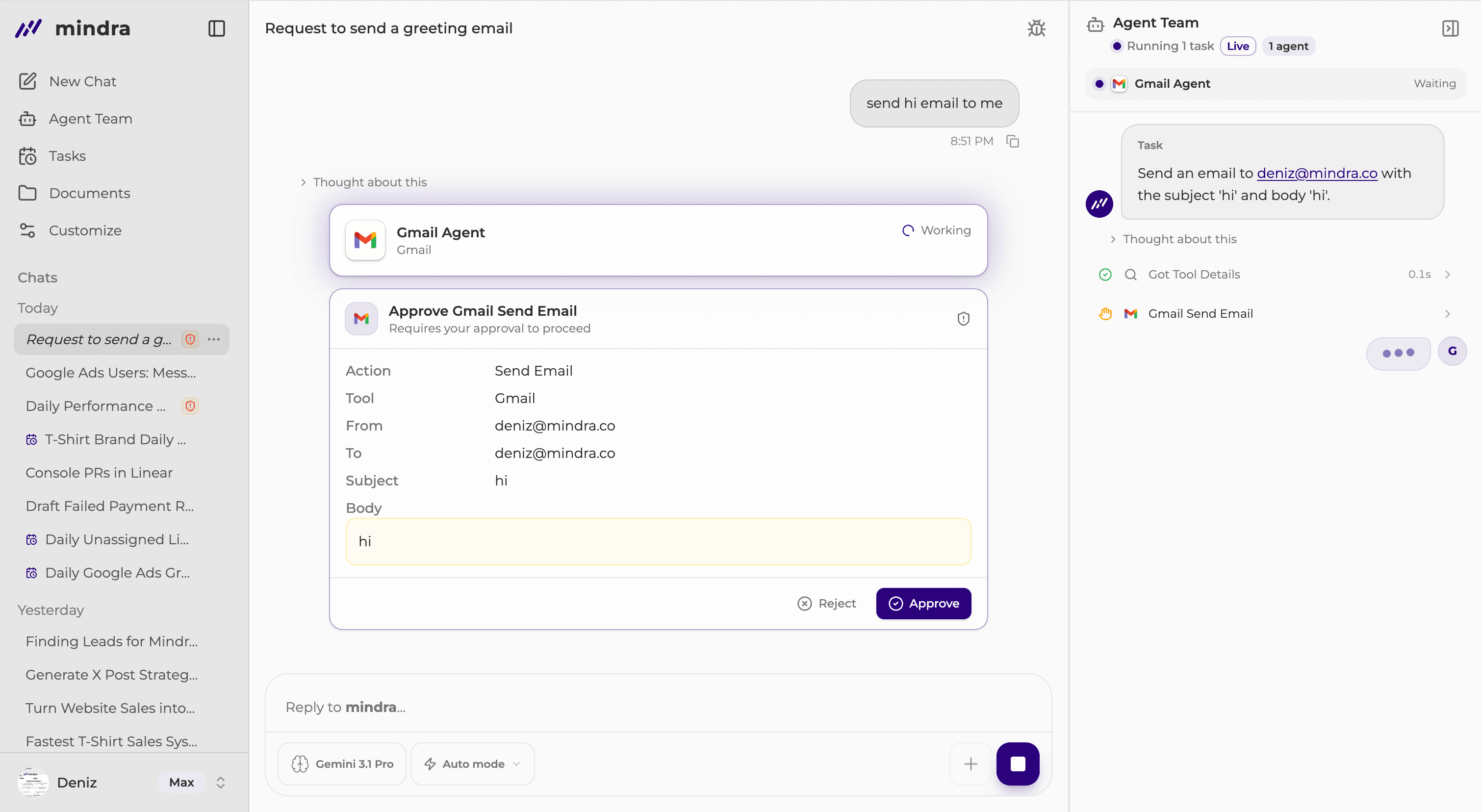
When the work needs your approval, Mindra shows a Requires your approval to proceed card in the conversation.
Review the action and inputs
Confirm that the destination, scope, and proposed change match your request.
Select Approve or Reject
Approve lets the action run. Reject stops that action.
Check the approval result
The card changes to Approved or Rejected. Approved work resumes; rejected work does not run the action.
Other approval states
- Approve all
- Several normal queued actions can be approved together. Blocked items still require individual review.
- Background approval
- Open the background approval panel to decide while continuing to use the chat.
- Allow once
- Allows only the current eligible request. It does not change the saved personal policy.
- Organization override
- Only an owner or admin can receive an eligible one-time organization override. A hard block cannot be overridden.
- Expired or already resolved
- Expired decisions must be requested again. Already-resolved cards show the decision made elsewhere.
Change when Mindra asks
For connector actions, open Customize → Connectors → Actions. Members can change Personal; owners and admins can change Org.
For one agent, open Agent Team → My Team, select the agent, and review Assigned Tools.
- Allow
- The action can run automatically when no stricter policy blocks it.
- Ask
- Mindra asks before the action runs.
- Block
- The action does not run. Customize can label this level Never.
Ask first is a chat mode
Ask first affects normal actions in the current chat. It does not replace a saved action-level Ask setting or relax a blocked action.
You’re done when...
The card shows Approved or Rejected. Any saved policy change shows the selected Allow, Ask, or Block level.
Troubleshooting
Processing does not finish
Do not submit repeatedly. If the decision fails, the card becomes actionable again and shows Approval decision failed. Try again.
The approval expired
Ask Mindra to perform the action again. An expired card cannot be decided.
The action was already decided
Another valid surface or approver resolved it first. Follow the Approved or Rejected state now shown.
Approve all is missing
Blocked or policy-override items require individual review.
A personal policy cannot be relaxed
Personal settings can match or tighten the organization baseline, not make it more permissive.